Popular Articles
 Creator Tools
05.11.2026
4K Video: Bitrate and File Size per Hour
Learn how 4K video bitrate translates into file size per hour, so you can plan storage and choose export settings. This guide explains the relationship between resolution, frame rate, codec, and bitrate, with practical examples for common formats. You’ll also get a checklist for estimating sizes, common mistakes that cause surprises, and an FAQ covering VBR vs CBR, audio tracks, and container overhead.
 Creator Tools
28.10.2026
24, 30 or 60 FPS for Creator Workflows
Creators choose between 24, 30, and 60 FPS for video capture, editing, and delivery. This guide explains how frame rate affects motion feel, file size, editing performance, and playback compatibility across common platforms. It also covers dependencies like shutter angle, sensor readout, codec behavior, and audio sync. You’ll learn practical selection rules for different workflows, plus checklists and common mistakes to avoid.
 Creator Tools
24.10.2026
16-bit vs 24-bit Audio Recording
This guide explains how 16-bit and 24-bit audio recording differ in dynamic range, file size, and real-world results. It’s for listeners, podcasters, musicians, and home recordists who want reliable expectations from their microphones, interfaces, and software. You’ll learn what bit depth changes during recording and editing, why clipping matters more than “more bits,” and how to choose settings for speech, music, and post-production workflows.
 Creator Tools
19.10.2026
Video Bitrate: Mbps Needed for 4K Uploads
Uploading 4K video can be frustrating if your internet connection can’t keep up, leading to buffering, stalled progress bars, or failed uploads. This guide breaks down how much upload speed (in Mbps) you actually need, especially if you shoot in 4K, edit on your computer, and then send files to cloud storage or platforms like YouTube. It explains how bitrate, frame rate, codec choice, audio quality, and even container/metadata overhead all influence file size and upload time. You’ll also get simple methods to estimate the Mbps you need and practical tips to test your connection and workflow safely before committing to big transfers.
 Creator Tools
13.10.2026
Color Space: sRGB vs Display P3 for Digital Content
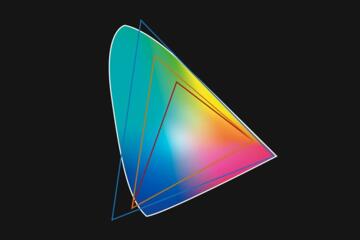
Colors that look perfect on your phone can end up dull, too punchy, or just “off” on someone else’s screen—and the usual culprit is the color space. This article walks through what sRGB and Display P3 actually represent and why they matter for photos, illustrations, UI graphics, and video on phones, tablets, and computers. It’s aimed at creators, designers, and detail-oriented viewers who want their work to look consistent across devices and platforms. You’ll see where sRGB/P3 mismatches come from, how to check whether your exports are tagged correctly, and how to run quick tests before you publish. It also covers which settings make the most sense for web and social, for print handoff, and for “HDR-adjacent” workflows where wide color can surprise you. Practical checklists and real-world mistakes help you avoid washed-out exports, neon oversaturation, and unpredictable results.
 Creator Tools
07.10.2026
WebP vs AVIF: Which Image Format Should You Use?
WebP and AVIF can shrink image files dramatically, but choosing the right format isn’t just about getting the smallest number. This guide walks through how each format compresses images, why decoding speed and device support matter, and when WebP is the safer choice versus when AVIF is worth the extra effort. It’s aimed at site owners, designers, and developers who want quicker page loads, fewer layout shifts, and fewer “why is this image broken?” surprises. You’ll learn how browser support, transparency, color depth, and encoding settings change real-world results, and you’ll get practical steps for testing different exports, measuring performance, and avoiding common pitfalls.
 Creator Tools
01.10.2026
RAW vs JPEG: Which Format Fits Creator Workflows?
Creators choose between RAW and JPEG for capture, editing, and sharing. This guide explains how each format stores image data, what that means for exposure changes, color grading, and storage. It also covers common workflow mistakes, file-size tradeoffs, and practical decision rules for photographers, designers, and content teams. You’ll learn which format fits specific tasks, how to test your own camera pipeline, and what to check in editing software.
 Creator Tools
25.09.2026
LUFS Explained: YouTube and Podcast Loudness Targets
LUFS describes perceived loudness using a standardized measurement for audio. This matters for YouTube videos and podcast episodes because platforms apply loudness normalization that can change your mix’s balance. This guide explains what LUFS means, how YouTube and common podcast workflows interpret targets, and how to measure and adjust loudness with practical tools. You’ll learn typical target ranges, how to avoid clipping, and how to verify results after upload.
 Creator Tools
19.09.2026
Microphone Bit Depth: 16-bit vs 24-bit Audio
Learn how microphone bit depth affects recorded sound quality for speech, podcasts, and telehealth-style voice capture. It’s for readers comparing 16-bit and 24-bit settings on phones, USB mics, and audio apps who want reliable expectations. You’ll learn what bit depth changes, what it does not change, how noise and gain staging dominate results, and how to choose settings that match your recording environment.
 Creator Tools
13.09.2026
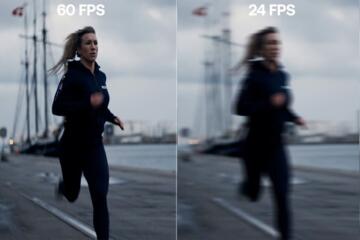
24 vs 30 vs 60 FPS: Choosing a Frame Rate
Frame rate affects motion smoothness, perceived sharpness, and how video feels during playback. This guide explains 24, 30, and 60 FPS in practical terms for viewers and creators, with clear trade-offs for bandwidth, storage, and device support. You’ll learn how FPS interacts with shutter speed, motion blur, judder, and audio sync, plus how to choose settings for different content types and screens.