Remote Team Stack Basics
A remote team’s software stack is the set of tools that covers communication, shared work artifacts, task tracking, code or document workflows, and access control. The stack matters because remote work removes the “hallway” layer that normally catches misunderstandings and missing context. A practical stack also reduces the number of places where decisions and files live, since scattered records create rework.
Start with a simple map: who needs to talk, where work is written, how tasks move from idea to done, and how access is governed. For example, a product team often uses a chat tool for quick coordination, a document system for specs, and a project tracker for milestones. A software team adds version control, code review, and continuous integration. A customer-facing team adds ticketing and knowledge base search, which changes how information is structured.
Even when teams use different brands, the categories stay consistent: identity and access management, device and endpoint security, communication, collaboration documents, work management, and delivery workflows. You can pick tools later, but you cannot skip the categories without creating gaps that show up as missing approvals, lost files, or inconsistent access.
Problems And Pain Points
Teams often get the stack wrong by treating tools as substitutes for process. A chat channel does not replace a decision record, and a shared folder does not replace version history. When the team relies on memory, the stack becomes a scavenger hunt during incidents, audits, or customer escalations.
Another common failure is dependency sprawl. If identity is managed in one place, devices in another, and file access in a third, permissions drift over time. That drift shows up as “works for me” access issues, broken shared links, and repeated password resets. It also increases the risk of over-permissioning, since people grant access to “get it done” and then forget to remove it.
Security gaps also come from mismatched expectations. Many teams assume that enabling multi-factor authentication on one system covers everything, but access often extends to third-party apps, browser sessions, and API tokens. Endpoint security varies widely, and unmanaged devices can bypass protections that the team assumes are in place. A remote stack needs a clear boundary between corporate-managed devices and personal devices, with different rules for each.
Solutions And Advice
Identity, Access, And MFA
Use a centralized identity provider so the team can manage sign-in, group membership, and app access from one place. Enforce multi-factor authentication for all users, and require phishing-resistant methods where feasible (for example, FIDO2 security keys). A mild aside from real deployments: many teams enable MFA but leave legacy accounts active, which creates “shadow access” during offboarding.
Set up role-based access for core systems like repositories, shared drives, and ticketing. Keep group membership tied to job function rather than individual exceptions. For offboarding, automate access removal on the identity provider side, then verify downstream systems within a fixed window. A realistic outcome target: after a rollout, most teams aim for offboarding completion within the same business day for access revocation, not a week later.
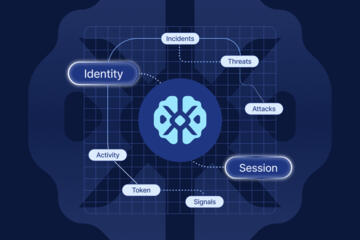
Track sessions and token lifetimes. Browser-based sessions and API tokens can outlast password changes, so define a policy for token rotation and device trust. If you use single sign-on, document which apps support SCIM provisioning and which require manual deprovisioning.
Docs, Knowledge, And Versioning
Choose a documentation system that supports version history, permissions, and search. For many teams, a wiki-style docs platform plus a shared drive works better than a single folder tree. Use templates for specs, meeting notes, and runbooks so the team writes the same kinds of information every time.
Set naming conventions and folder structures that match how people search. A small detail that often matters: decide whether dates go in titles (for example, “Incident-2026-08-01”) or in metadata, because mixing both creates duplicate entries. If you use a docs platform, confirm that it supports exporting or migration paths, since vendor lock-in becomes a real operational risk.
For knowledge bases, connect articles to ticket categories and tag them consistently. A measurable goal: reduce repeat questions by tracking ticket reasons over 30–60 days after publishing updated documentation. If repeat questions do not drop, the issue is usually article discoverability or missing troubleshooting steps, not the absence of content.
Work Tracking And Delivery
Use a work management tool for tasks, owners, and status transitions. Keep the workflow small: triage, in progress, review, done. Overly complex statuses create “status theater,” where tasks sit in the wrong column because the team does not understand the rules.
For software delivery, connect version control to the work tracker. Require pull requests with code review and link them to tickets. Many teams adopt a minimum checklist: tests pass, reviewer approval, and changelog entry. A practical expectation: if your CI pipeline takes longer than 15–20 minutes per run, developers start skipping checks, which undermines the stack.
For non-code work, use the same linking idea: connect deliverables to tasks and attach artifacts like designs or spreadsheets. When a decision changes scope, record it in the task description or a linked doc, not in a chat thread that disappears into scrollback.
Security, Endpoints, And Backups
Endpoint management matters because remote work shifts risk to laptops. Use device management to enforce disk encryption, screen lock, and patching cadence. If the team uses personal devices, define a separate policy for access to sensitive systems, such as requiring managed browser profiles or limiting access to read-only resources.
Backups should cover both data and configuration. Cloud storage often includes versioning, but it does not replace a backup strategy for accidental deletion, ransomware, or compromised accounts. Confirm backup retention periods and restore testing frequency. A realistic target: run a restore test at least quarterly for critical data sets, and document the time-to-restore.
Log access and changes. Centralize logs for identity events, repository access, and admin actions. Many teams miss the “admin action” trail, then struggle to answer who changed permissions during an incident. If you use a SIEM or log platform, start with a small set of alerts tied to real events, not a long list of noisy rules.
Case Examples
Example 1: Product Team With Mixed Documentation
A 12-person product team worked across time zones. They used chat for coordination, but specs lived in multiple places: chat threads, a shared drive, and a wiki. After consolidating specs into the wiki with a template, they linked each spec to a work tracker epic. Within 45 days, the team reduced “where is the latest spec?” questions during planning meetings, and fewer tasks were re-scoped after review because the spec version history made changes visible.
Example 2: Small Engineering Team With CI Friction
A five-person engineering team had a CI pipeline that ran unit tests and linting, but the pipeline took about 25 minutes. Developers began waiting until the end of the day to run checks, which increased late-stage failures. They split the pipeline into fast checks for pull requests and slower checks for merges. After the change, pull request feedback arrived sooner, and the team reported fewer last-minute rollbacks during releases, though they still needed a weekly review of flaky tests.
Comparison Checklist
| Category | What To Verify | Common Tradeoff | Decision Tip |
|---|---|---|---|
| Identity | SSO, MFA enforcement, SCIM provisioning, offboarding flow | More controls can slow onboarding if groups are messy | Pilot with one team and measure time-to-access |
| Chat | Search quality, retention policy, admin controls | Chat history can become the “source of truth” by accident | Define where decisions get recorded |
| Docs | Version history, permissions, export options | Permissions complexity grows with org size | Use templates and a small set of doc types |
| Work Tracking | Workflow states, automation rules, reporting | Over-customization creates confusion | Start with triage → in progress → review → done |
| Delivery | CI runtime, test reliability, audit trail | Fast feedback can hide deeper issues if tests are weak | Measure flaky test rate and fix it early |
| Backups | Retention, restore testing, ransomware recovery | More retention costs money and storage | Restore test quarterly for critical data |
Step-by-step checklist for a first rollout: define categories, pick one tool per category, set access roles, create templates, connect work items to artifacts, then run a 30-day pilot with metrics like time-to-access, number of “where is the latest file” incidents, and CI feedback latency. If you track those numbers, you can adjust without guessing.
Common Mistakes To Avoid
Teams often buy tools before they define ownership. If nobody owns the documentation structure, the docs become a graveyard of outdated pages. Assign a small set of maintainers for each doc type and require periodic review dates.
Another mistake is treating chat as a decision log. Chat threads bury approvals and rationale, and search results depend on consistent keywords. Move decisions into a doc or a ticket comment with a stable link, then summarize the outcome back into chat so the team sees the pointer.
Permission design fails when teams rely on ad hoc sharing. A shared link that works today can become a risk later if permissions change or if the link is forwarded. Prefer group-based access and remove individual exceptions after a short time window.
CI and automation mistakes show up as “green builds” that do not reflect reality. Flaky tests train developers to ignore failures. Track flake rate and quarantine unstable tests until they are fixed, even if it slows the pipeline temporarily.
Finally, teams skip restore testing. Backups that never get restored during a drill become a false sense of safety. A restore test on a staging account on a known date, like 2026-08-01, reveals gaps in permissions, encryption keys, or data mapping that a checklist cannot catch.
FAQ
What Should A Remote Team Standardize?
Standardize identity and access, documentation templates, task workflow states, and the link rules between chat, tickets, and files. Consistency reduces rework during onboarding and incident response.
How Many Tools Can A Team Use?
Use one tool per category at first: chat, docs, work tracking, and delivery. Add a second tool only when a measurable gap remains after process changes.
How Do We Handle Personal Devices?
Define device trust levels and restrict access based on risk. Many teams allow personal devices for low-sensitivity work while requiring managed devices or stricter browser controls for sensitive systems.
What Metrics Show The Stack Is Working?
Track time-to-access for new hires, number of unresolved permission issues, CI feedback latency, and repeat questions tied to missing or outdated documentation. These metrics connect tooling to outcomes.
Do We Need Backups If Data Is In The Cloud?
Yes, because cloud storage versioning does not replace recovery testing for deletion, ransomware, or compromised accounts. Define retention and run restore drills for critical datasets.
Author's Insight
A remote team stack succeeds when it reduces ambiguity: one place for decisions, one place for the latest spec, and one workflow for moving work forward. Tool choice matters less than permission design, linking rules, and onboarding templates that prevent “tribal knowledge” from becoming the system. Security controls work only when they match real access paths, including tokens, third-party apps, and admin actions. When teams measure time-to-access and restore outcomes, they can correct problems without relying on vendor promises.
Key Takeaways
- Cover identity, communication, docs, work tracking, delivery workflows, endpoint security, and backups as distinct categories.
- Design permissions with groups and offboarding automation, then verify downstream access revocation.
- Connect chat to stable records: decisions belong in docs or tickets, not in scrollback.
- Measure onboarding time, CI feedback latency, and restore test results to guide tool and process changes.